
Screenshots for NativePHP Mobile#
Lock down sensitive screens. Catch capture attempts. Respond instantly.#
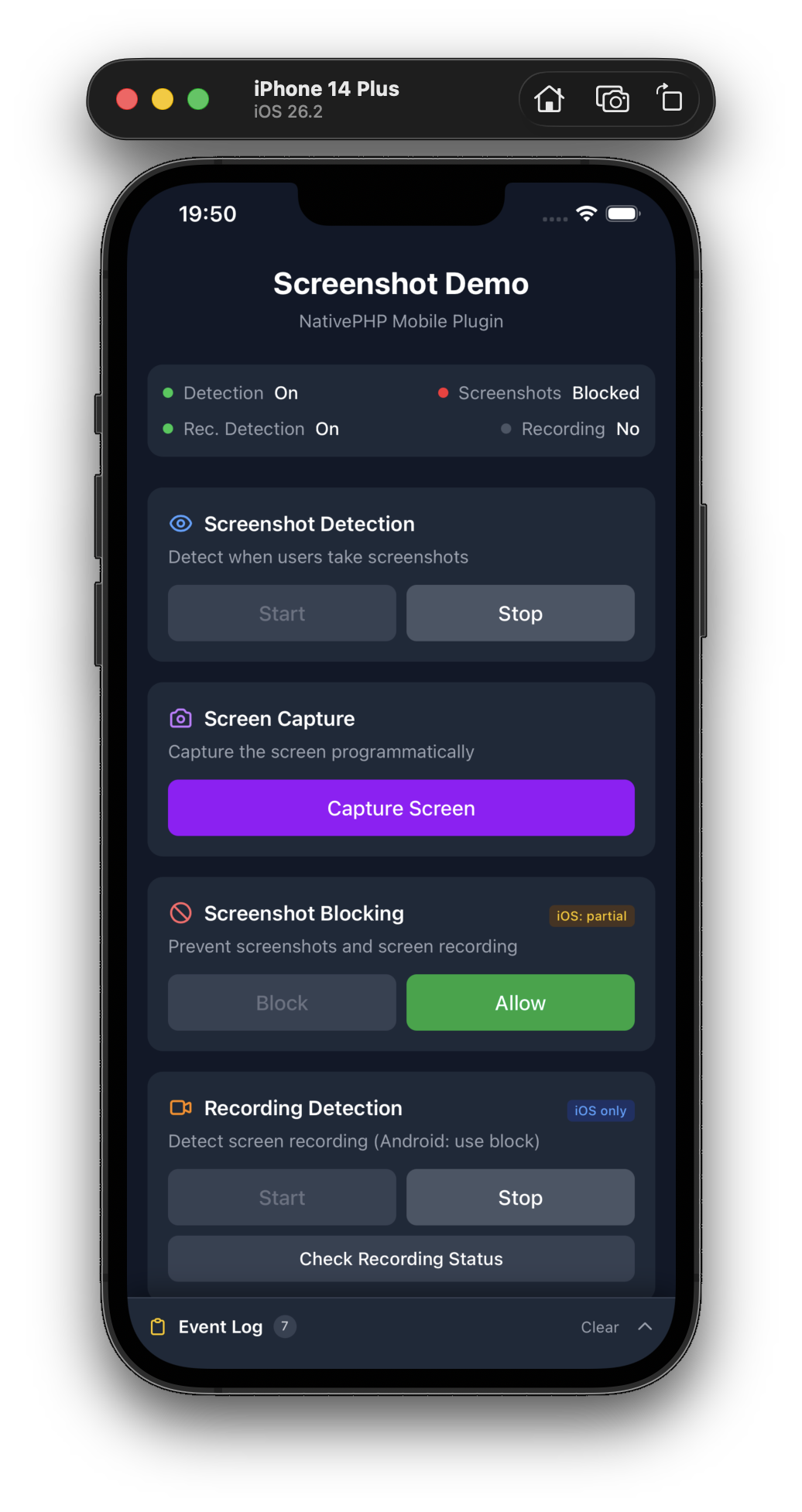
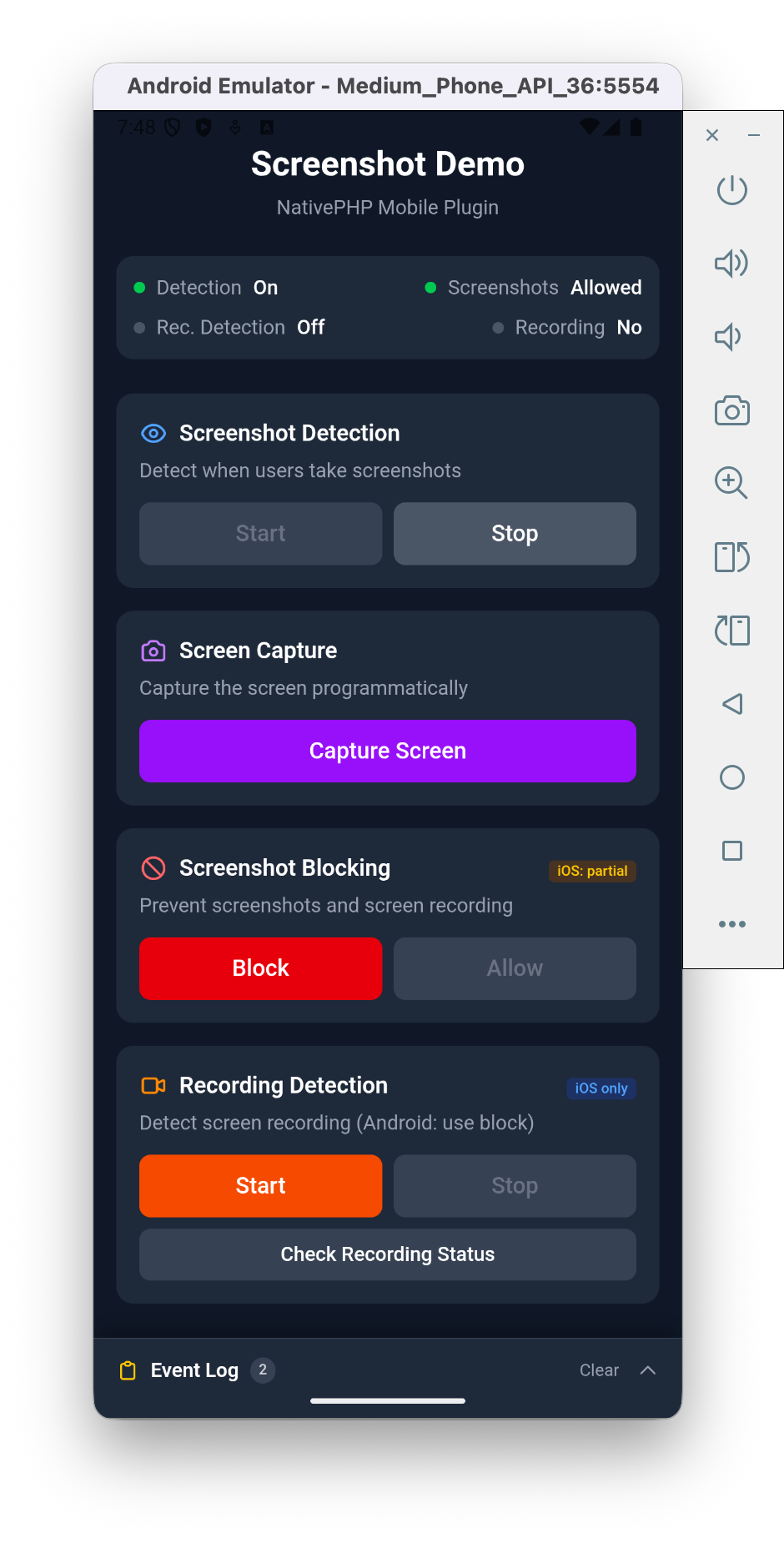
The privacy layer your mobile app was missing. Block screenshots and screen recordings on screens showing account balances, medical records, exam questions or premium content — and get a real-time event the moment a user tries to capture something they shouldn't.
Why this plugin?#
- 🔒 Block screenshots & screen recordings —
FLAG_SECUREon Android, privacy overlay on iOS. One line of PHP. - 🛎️ Detect every capture attempt — fire a Laravel event the instant a user screenshots or starts recording.
- 📸 Capture programmatically — grab the current screen from server code for bug reports, feedback, or audit trails.
- 📱 Battle-tested on both platforms — iOS 17+ and Android 8+ with platform-native implementations.
Features at a glance#
| Feature | Android | iOS |
|---|---|---|
| Programmatic screenshot capture | ✅ | ✅ |
| Screenshot detection | ✅ | ✅ |
| Screenshot blocking | ✅ | ✅ privacy overlay |
| Screen recording detection | ✅ Android 15+ | ✅ |
| Screen recording blocking | ✅ | ✅ privacy overlay |
Perfect for#
Banking & fintech · Healthcare portals · Exam proctoring · Enterprise document viewers · Premium video & streaming · Legal & confidential communications
Installation#
composer require srwiez/nativephp-mobile-screenshots php artisan vendor:publish --tag=nativephp-plugins-provider php artisan native:plugin:register srwiez/nativephp-mobile-screenshotsQuick Start#
use SRWieZ\NativePHP\Mobile\Screenshots\Facades\Screenshots; // Protect a sensitive screenScreenshots::block(); // Detect when users take screenshotsScreenshots::startDetection(); // Capture the screen programmatically$captureId = Screenshots::capture();API Reference#
Screenshot Detection#
Detect when users take screenshots of your app.
// Start listening for screenshotsScreenshots::startDetection(); // Stop listeningScreenshots::stopDetection();| Platform | Behavior |
|---|---|
| Android | Uses ScreenCaptureCallback (API 34+, no permission prompt). Pre-14 falls back to a MediaStore observer that reports the file path — your app must declare READ_MEDIA_IMAGES (API 33+) or READ_EXTERNAL_STORAGE itself for that. |
| iOS | Uses userDidTakeScreenshotNotification. Path not available. |
Note
Blocking and detection compose: with block() active on Android 14+,
ScreenCaptureCallback still fires when the user attempts a screenshot —
the system saves a blanked image and shows its own "app detected this
screenshot" notice (verified on Android 16). So you can block sensitive
screens and still audit capture attempts.
Screenshot Blocking#
Prevent screenshots from being captured.
// Block screenshotsScreenshots::block(); // Customize or disable the iOS recording overlayScreenshots::block(privacyText: 'Recording is disabled on this screen');Screenshots::block(privacyOverlay: false); // Allow screenshots againScreenshots::allow(); // Check current status$blocked = Screenshots::isBlocked();| Platform | Behavior |
|---|---|
| Android | Uses FLAG_SECURE - completely prevents screenshots and screen recordings. Screenshots appear black. |
| iOS | Secure text field technique: the OS compositor blanks the window in screenshots and recordings. Optionally shows a privacy overlay with a configurable message while the screen is recorded or mirrored. |
Caution
iOS Limitation: Apple provides no official API to prevent screenshots. This plugin uses the secure text field technique (the same approach Expo ships) — it relies on undocumented OS behavior, works only on physical devices, and should be re-tested on each new iOS release. For sensitive data on iOS, combine blocking with detection to log and respond to capture attempts.
Programmatic Screen Capture#
Capture the current screen from your app code.
// Returns a capture ID to correlate with events$captureId = Screenshots::capture();Screen Recording Detection iOS 17+ · Android 15+#
Detect and respond to screen recording attempts.
// Check if currently being recorded (on Android, start detection first)$recording = Screenshots::isRecording(); // bool // Start listening for recording changesScreenshots::startRecordingDetection(); // Stop listeningScreenshots::stopRecordingDetection();Events#
Listen for native events using NativePHP's event system.
ScreenshotDetected#
Fired when the user takes a screenshot.
use Native\Mobile\Attributes\OnNative;use SRWieZ\NativePHP\Mobile\Screenshots\Events\ScreenshotDetected; #[OnNative(ScreenshotDetected::class)]public function handleScreenshot($path = null, $timestamp = null){ // $path is only available on Android Log::warning('User took a screenshot', ['path' => $path]);}ScreenshotCaptured#
Fired when programmatic capture completes successfully.
use SRWieZ\NativePHP\Mobile\Screenshots\Events\ScreenshotCaptured; #[OnNative(ScreenshotCaptured::class)]public function handleCaptured($path, $id = null, $success = true){ // Process the captured image at $path}ScreenshotCaptureFailed#
Fired when programmatic capture fails.
use SRWieZ\NativePHP\Mobile\Screenshots\Events\ScreenshotCaptureFailed; #[OnNative(ScreenshotCaptureFailed::class)]public function handleFailed($error, $id = null){ Log::error('Screenshot capture failed', ['error' => $error]);}ScreenRecordingStarted iOS 17+ · Android 15+#
Fired when screen recording begins.
use SRWieZ\NativePHP\Mobile\Screenshots\Events\ScreenRecordingStarted; #[OnNative(ScreenRecordingStarted::class)]public function handleRecordingStarted($timestamp = null){ // User started screen recording // Call Screenshots::block() if you want to show a privacy screen}ScreenRecordingStopped iOS 17+ · Android 15+#
Fired when screen recording ends.
use SRWieZ\NativePHP\Mobile\Screenshots\Events\ScreenRecordingStopped; #[OnNative(ScreenRecordingStopped::class)]public function handleRecordingStopped($timestamp = null){ // User stopped screen recording}JavaScript API#
import { mobileScreenshots } from '../../vendor/srwiez/nativephp-mobile-screenshots/resources/js/mobileScreenshots.js'; // Detectionawait mobileScreenshots.startDetection();await mobileScreenshots.stopDetection(); // Blockingawait mobileScreenshots.block();await mobileScreenshots.block({ privacy_overlay: false });await mobileScreenshots.allow();const { blocked } = await mobileScreenshots.isBlocked(); // Captureconst { id } = await mobileScreenshots.capture(); // Recording detection (iOS 17+, Android 15+)const { recording } = await mobileScreenshots.isRecording();await mobileScreenshots.startRecordingDetection();await mobileScreenshots.stopRecordingDetection();Platform Comparison#
Android#
Android provides robust, system-level protection through FLAG_SECURE:
- Screenshots: Completely blocked - appear as black images
- Screen Recording: Completely blocked - shows black screen
- Screen Mirroring: Blocked
- Reliability: Very high - enforced at the window manager level
iOS#
iOS has more limited APIs, so this plugin uses creative workarounds:
- Screenshots: Blocked best-effort via the secure text field technique (undocumented OS behavior, device-only); always detectable instantly
- Screen Recording: Detected via
capturedDidChangeNotification+UIScreen.isCaptured(the newer sceneCaptureState trait lags the notification, so it is deliberately not used);block()can also show a privacy overlay while recording - Privacy Overlay: Optional black screen with a configurable message during recording/mirroring
- Reliability: Best-effort - determined users may still capture content
Recommended Strategy#
// For maximum protection on both platforms: // 1. Always block when showing sensitive contentScreenshots::block(); // 2. Start detection to log/audit attemptsScreenshots::startDetection(); // 3. Detect screen recording (iOS 17+, Android 15+; fires events only)Screenshots::startRecordingDetection(); // block() handles privacy screen during recording on iOSUse Cases#
- Banking & Finance - Protect account balances, transaction history, card details
- Healthcare - Secure patient records, lab results, prescriptions
- Enterprise - Guard confidential documents, internal communications
- Education - Prevent cheating during online exams
- Media & Entertainment - Protect premium content from piracy
- Legal - Secure sensitive case documents and communications
Version Support#
| Platform | Minimum Version |
|---|---|
| Android | 8.0 (API 26) |
| iOS | 17.0 |
Features requiring higher versions:
- Android 15+ (API 35): Screen recording detection via
addScreenRecordingCallback - Android 14+ (API 34): Screenshot detection via
ScreenCaptureCallback, no permission needed - Pre-Android 14: Screenshot detection falls back to a
MediaStoreobserver — declareREAD_MEDIA_IMAGES(API 33+) orREAD_EXTERNAL_STORAGEin your own app if you need it; the plugin no longer injects these Play-policy-sensitive permissions - NativePHP Mobile v4 builds enforce Android API 29 / iOS 18 minimums
The DETECT_SCREEN_CAPTURE and DETECT_SCREEN_RECORDING permissions are
install-time (no user prompt) and added automatically by the plugin.
Testing your app#
On NativePHP Mobile v4 the plugin registers testing macros on the
FakeBridge, so your app tests can assert in domain terms:
use Native\Mobile\Testing\FakeBridge; $bridge = FakeBridge::enable()->withRecording(); // ... exercise your component ... $bridge->assertBlocked();$bridge->assertDetectionStarted();Support#
Bugs, questions, and feature requests should be reported at github.com/SRWieZ/nativephp-mobile-packages.